 By Rahul Vats
 Tracking your leave request has become simple and transparent with the HRMS Bihar Portal. Instead of visiting offices or waiting for manual updates, employees can now check their leave status online within minutes. However, many users still feel unsure about where to find this option and how to properly track their request.
Therefore, this guide explains how to check leave status in HRMS Bihar step by step, along with useful tips, common issues, and solutions. Moreover, you will learn how to stay up to date on your leave approvals without any confusion.
What is Leave Status in HRMS Bihar?
Before you proceed, it is important to understand what leave status means. Leave status shows the current stage of your leave application after submission.
Common Leave Status Types:
- Pending: Your request is under review
- Approved: Your leave has been accepted
- Rejected: Your request has been denied
Therefore, checking leave status helps you plan your schedule accordingly.
Requirements Before Checking Leave Status
Before you start, make sure you have the necessary details ready. Otherwise, you may face delays.
You Need:
- Username or Employee ID
- Password
- Registered mobile number (for OTP if required)
- Stable internet connection
In addition, use an updated browser to avoid technical issues.
Step-by-Step Process to Check Leave Status
Now, let’s go through the complete process. Follow each step carefully for a smooth experience.
Step 1: Visit the Official HRMS Bihar Portal
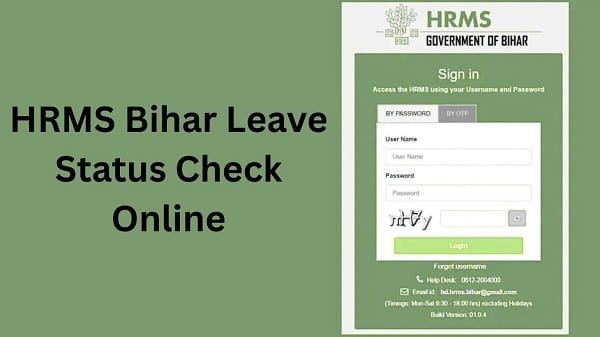
First, open your browser and visit the official HRMS Bihar website. Always ensure you access the correct portal to keep your information safe.
Once the homepage loads, you will see the login section.
Step 2: Log In to Your Account
Next, enter your login details:
- Username or Employee ID
- Password
After that, complete OTP verification if required. Then, click on the Login button.
If your details are correct, you will be redirected to your dashboard.
Step 3: Go to the Leave Management Section
After logging in, look for the Leave Management section.
In most cases, this section contains options such as:
- Apply Leave
- Leave History
- Leave Status
Step 4: Select Leave Status or Leave History
Now, click on the Leave Status or Leave History option.
Then, you may need to select:
- Date range
- Leave type (if required)
Make sure you choose the correct filters to view your request.
Step 5: View Your Leave Status
After selecting the details, click on the View button.
Your leave applications will appear on the screen along with their current status.
You Will See:
- Leave dates
- Leave type
- Status (Pending/Approved/Rejected)
- Remarks (if any)
Therefore, you can easily track your request.
Step 6: Download or Save Details (Optional)
If needed, you can download or print your leave details for records.
This helps you maintain proper documentation.
Benefits of Checking Leave Status Online
Checking your leave status online offers several advantages.
Key Benefits:
- Real-Time Updates: Get instant status
- Transparency: Clear visibility of approvals
- Convenience: No need to visit offices
- Time-Saving: Quick access anytime
- Better Planning: Helps manage your schedule
As a result, the system improves efficiency and communication.
Common Issues While Checking Leave Status (And Fixes)
Although the process is simple, users sometimes face issues. However, you can easily fix them.
1. Unable to Log In
This issue often occurs due to incorrect credentials.
Solution:
- Recheck username and password
- Reset password if needed
2. Leave Status Not Showing
Sometimes, no data appears after selecting options.
Solution:
- Check the correct date range
- Ensure the leave request was submitted
- Refresh the page
3. Page Not Loading
At times, the portal may load slowly.
Solution:
- Clear browser cache
- Use another browser
- Check the internet connection
4. Incorrect Status Display
If the status appears incorrect, verify it.
Solution:
- Contact your department
- Check for recent updates
Tips for Smooth Leave Status Tracking
To avoid issues, follow these simple tips.
Helpful Tips:
- Check status regularly
- Use a stable internet connection
- Avoid peak hours
- Keep login details secure
As a result, you can track your leave without interruptions.
Important Points to Remember
Before checking your leave status, keep these points in mind:
- Status may take time to update
- Approval depends on your department
- Always verify dates and details
Therefore, patience and accuracy are important.
What to Do If Leave Status Is Not Updated
If your leave status does not update, you should take action.
You Can:
- Wait for some time
- Contact your reporting officer
- Reach out to the HR department
They can provide accurate information and updates.
FAQs on HRMS Bihar Leave Status
Q1. How can I check my leave status?
A: You can check it in the Leave Management section after logging in.
Q2. Why is my leave status still pending?
A: It may still be under review by your authority.
Q3. Can I check leave status on mobile?
A: Yes, you can use a mobile browser.
Q4. How long does approval take?
A: It depends on your department.
Q5. What if my leave is rejected?
A: You can check the reason and apply again.